

MCP Server: Model Context Protocol Explained
View on GitHub | Download Latest Release | Documentation
Introduction
AI assistants need access to external tools and data. They query databases, call APIs, read files, and execute code. Traditional approaches require custom integrations for each tool, which creates complexity, adds maintenance overhead, and causes vendor lock-in. The Model Context Protocol solves this problem by providing an open protocol that enables AI assistants to securely access external tools and resources through a standardized interface. MCP servers expose capabilities as tools and resources, and MCP clients connect to servers to use these capabilities. The protocol specification is maintained by Anthropic and is available as an open standard.
This guide explains MCP Server architecture, covers how MCP works with Claude Desktop, lists known MCP servers, and details NeuronMCP implementation. The guide covers protocol design, communication patterns, and real-world applications.
What is MCP Server
MCP Server is a software program that connects AI assistants to external systems. It acts as a translator between an AI assistant and the tools it needs to use. When an AI assistant wants to search a database, read files, or call an API, the MCP Server provides these capabilities in a standardized way. Without MCP, each AI assistant would need custom code to connect to each tool, which creates problems where developers must write integration code for every tool, maintenance becomes difficult when tools change, and different assistants use different integration methods. MCP solves this by providing one standard way to connect tools to AI assistants.
An MCP Server exposes capabilities as tools and resources. Tools are actions the AI can perform, such as searching a database, generating embeddings, or training a model. Resources are data the AI can read, such as database tables, file contents, or API responses. The AI assistant discovers available tools, calls tools when needed, and reads resources to get information. The server runs as a separate program that communicates with the AI assistant using text messages over standard input and output. No network setup is required, no ports need to be opened, and communication happens through pipes between processes. This design is simple and secure.
MCP Server is a protocol implementation that follows the Model Context Protocol specification. It implements JSON-RPC 2.0 over stdio transport. The server acts as a protocol handler that translates between MCP protocol messages and backend operations. The architecture follows a modular design where the protocol handler receives JSON-RPC requests, the request router directs requests to appropriate handlers, tool handlers execute specific operations, resource providers retrieve data from sources, and middleware components can intercept and modify requests and responses.
The server implements several protocol methods. The initialize method establishes the connection and negotiates capabilities. The tools/list method returns available tool definitions with JSON Schema input validation. The tools/call method executes tools with parameter validation and error handling. The resources/list method enumerates available resources. The resources/read method retrieves resource contents. The protocol uses JSON-RPC 2.0 for message formatting where each request includes a jsonrpc version, method name, parameters, and request ID, responses include the same request ID for correlation, and error responses follow JSON-RPC error object format with error codes, messages, and optional data.
Stdio transport means the server reads from standard input and writes to standard output. The client spawns the server process and connects via pipes. This provides process isolation where each server runs in its own process space, the server cannot access client memory, and the server cannot access client file descriptors except through the pipe. The protocol is language-agnostic, so servers can be implemented in C, Python, JavaScript, Go, Rust, or any language that can read stdin and write stdout. The only requirement is JSON parsing and generation capability, which enables diverse implementations optimized for different use cases.
Core Concepts
MCP defines three core concepts that structure the protocol. Tools are callable functions that perform operations. Each tool has a name, description, and input schema. The input schema uses JSON Schema to define parameter types, required fields, and validation rules. Tools can return text content, resource references, or error information. Examples include database queries that return results, embedding generation that returns vectors, and model training that returns metrics.
Resources are read-only data sources identified by URIs. Resources have a URI scheme that identifies the provider. Resources have MIME types that indicate content format. Resources can be listed, subscribed to for changes, and read. Examples include database tables accessible via neurondb:// URIs, files accessible via file:// URIs, and API endpoints accessible via http:// URIs.
Prompts are templates for generating content. They combine static text with dynamic variables. Prompts help structure AI responses by providing context and formatting guidelines. Prompts can include examples, instructions, and placeholders for dynamic content.
The protocol uses JSON-RPC 2.0 for communication. JSON-RPC is a stateless remote procedure call protocol. It uses JSON for data serialization. Each request includes a method name and parameters. Each response includes results or error information. Request IDs enable correlation between requests and responses. The protocol supports batch requests for multiple operations in one message.
Protocol Flow
MCP communication follows this flow. The client sends a JSON-RPC request with a method name and parameters. The server processes the request. The server returns a JSON-RPC response. Responses include results for successful operations. Responses include error information for failures.
The following diagram shows the detailed communication flow:
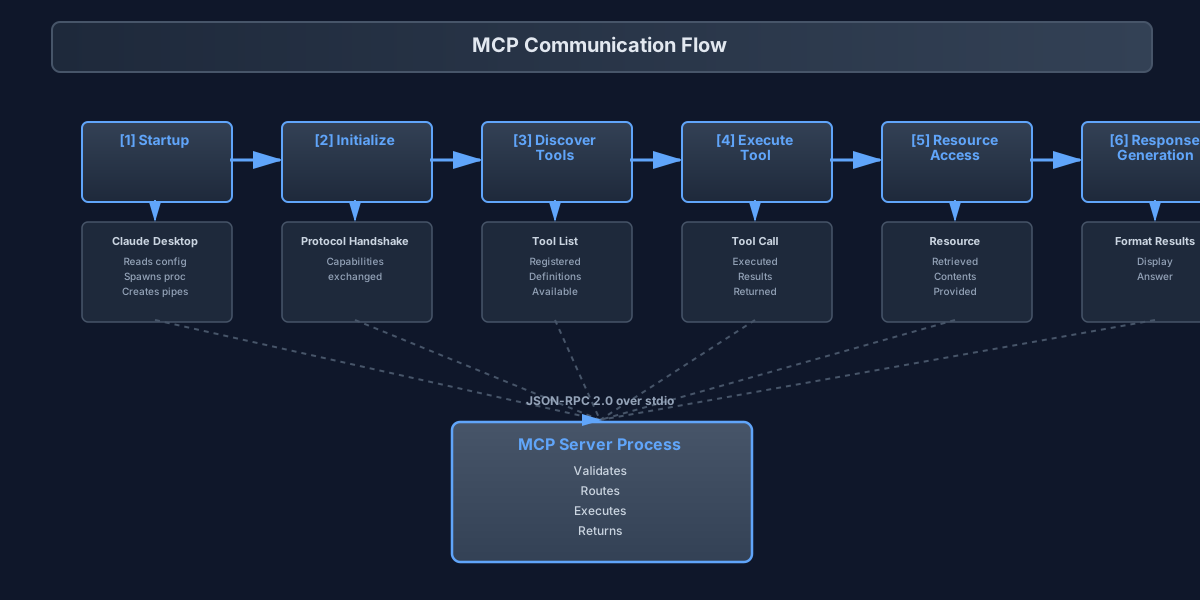
Detailed Step Breakdown:
[1] Startup: Claude Desktop reads configuration file → Identifies server command → Spawns server process → Creates stdio pipes (stdin/stdout) → Server process initialized
[2] Initialize: Client sends initialize request with protocol version and capabilities → Server validates protocol version → Server prepares server capabilities → Server responds with protocol version, capabilities, and server info → Protocol handshake complete
[3] Discover Tools: Client sends tools/list request → Server queries internal tool registry → Server builds tool definitions with names, descriptions, and input schemas → Server returns list of available tools → Tools registered and available for use
[4] Execute Tool: Client sends tools/call request with tool name and arguments → Server validates parameters against tool schema → Server routes request to appropriate tool handler → Server executes tool (connects to database, generates embedding, performs search, formats results) → Server returns results with content and resources → Tool execution complete
[5] Resource Access: Client sends resources/read request with resource URI → Server resolves resource URI → Server retrieves resource data from database or file system → Server returns resource contents with MIME type → Resource available for use
[6] Response: Client receives tool results and resource contents → Client incorporates results into response context → Client formats response for display → Response displayed to user with tool results integrated
Error Handling Flow: Invalid request detected → Server validates request format → Server detects error type (invalid params, method not found, internal error) → Server returns error response with code, message, and data → Client handles error and displays appropriate message
Transport Layer
MCP uses stdio for transport, where the server reads requests from stdin and writes responses to stdout. This design enables simple process-based communication where clients spawn server processes and communicate via pipes. No network configuration is required, no ports need to be opened, and no authentication needs to be managed. Stdio transport provides several benefits including process isolation that ensures servers cannot access client resources, simple deployment that requires only executable files, cross-platform support that works on Linux, macOS, and Windows, and no network dependencies that eliminate firewall configuration.
How MCP Server Works
MCP Server implements the Model Context Protocol specification. It handles protocol initialization, request routing, tool execution, resource access, and error handling. When a client connects, the server performs initialization where the client sends an initialize request with client capabilities, and the server responds with server capabilities and lists available tools, resources, and prompts. This handshake establishes the communication protocol.
Initialization request:
{"jsonrpc": "2.0","id": 1,"method": "initialize","params": {"protocolVersion": "2024-11-05","capabilities": {"tools": {},"resources": {}},"clientInfo": {"name": "claude-desktop","version": "2.0.0"}}}
Initialization response:
{"jsonrpc": "2.0","id": 1,"result": {"protocolVersion": "2024-11-05","capabilities": {"tools": {"listChanged": true},"resources": {"subscribe": true,"listChanged": true}},"serverInfo": {"name": "neurondb-mcp","version": "2.0.0"}}}
Tool Discovery
Clients discover available tools by calling the tools/list method. The server responds with a list of tool definitions where each tool includes a name, description, and input schema that defines required and optional parameters.
Tool list request:
{"jsonrpc": "2.0","id": 2,"method": "tools/list"}
Tool list response:
{"jsonrpc": "2.0","id": 2,"result": {"tools": [{"name": "vector_search","description": "Search for similar vectors in the database","inputSchema": {"type": "object","properties": {"query_vector": {"type": "array","items": { "type": "number" },"description": "Query vector for similarity search"},"table": {"type": "string","description": "Table name containing vectors"},"limit": {"type": "integer","description": "Maximum number of results","default": 10}},"required": ["query_vector", "table"]}}]}}
Tool Execution
Clients execute tools by calling the tools/call method with the tool name and arguments. The server validates parameters, executes the tool, and returns results that include output data or error information.
Tool call request:
{"jsonrpc": "2.0","id": 3,"method": "tools/call","params": {"name": "vector_search","arguments": {"query_vector": [0.1, 0.2, 0.3, 0.4],"table": "documents","limit": 5}}}
Tool call response:
{"jsonrpc": "2.0","id": 3,"result": {"content": [{"type": "text","text": "Found 5 similar documents"},{"type": "resource","resource": {"uri": "neurondb://results/123","mimeType": "application/json"}}],"isError": false}}
Resource Access
Clients access resources by calling the resources/read method with the resource URI. The server retrieves the resource and returns its contents. Resources can be files, database tables, or API endpoints.
Resource read request:
{"jsonrpc": "2.0","id": 4,"method": "resources/read","params": {"uri": "neurondb://table/documents"}}
Resource read response:
{"jsonrpc": "2.0","id": 4,"result": {"contents": [{"uri": "neurondb://table/documents","mimeType": "application/json","text": "{\"rows\": [{\"id\": 1, \"content\": \"Example document\"}]}"}]}}
Error Handling
MCP uses standard JSON-RPC error codes where invalid requests return code -32600, method not found returns code -32601, invalid parameters return code -32602, internal errors return code -32603, and server-defined errors use custom codes.
Error response:
{"jsonrpc": "2.0","id": 5,"error": {"code": -32602,"message": "Invalid params","data": {"field": "query_vector","reason": "Must be an array of numbers"}}}
How MCP Works with Claude Desktop
Claude Desktop is Anthropic's desktop application for Claude AI. It supports MCP servers through configuration files. Servers are configured in a settings file. Claude Desktop spawns server processes and communicates via stdio. The configuration file defines which MCP servers to use, how to start them, and what environment variables to set. Claude Desktop reads this configuration when it starts and automatically manages the server lifecycle throughout the session. For detailed setup instructions, see the Claude Desktop configuration guide.
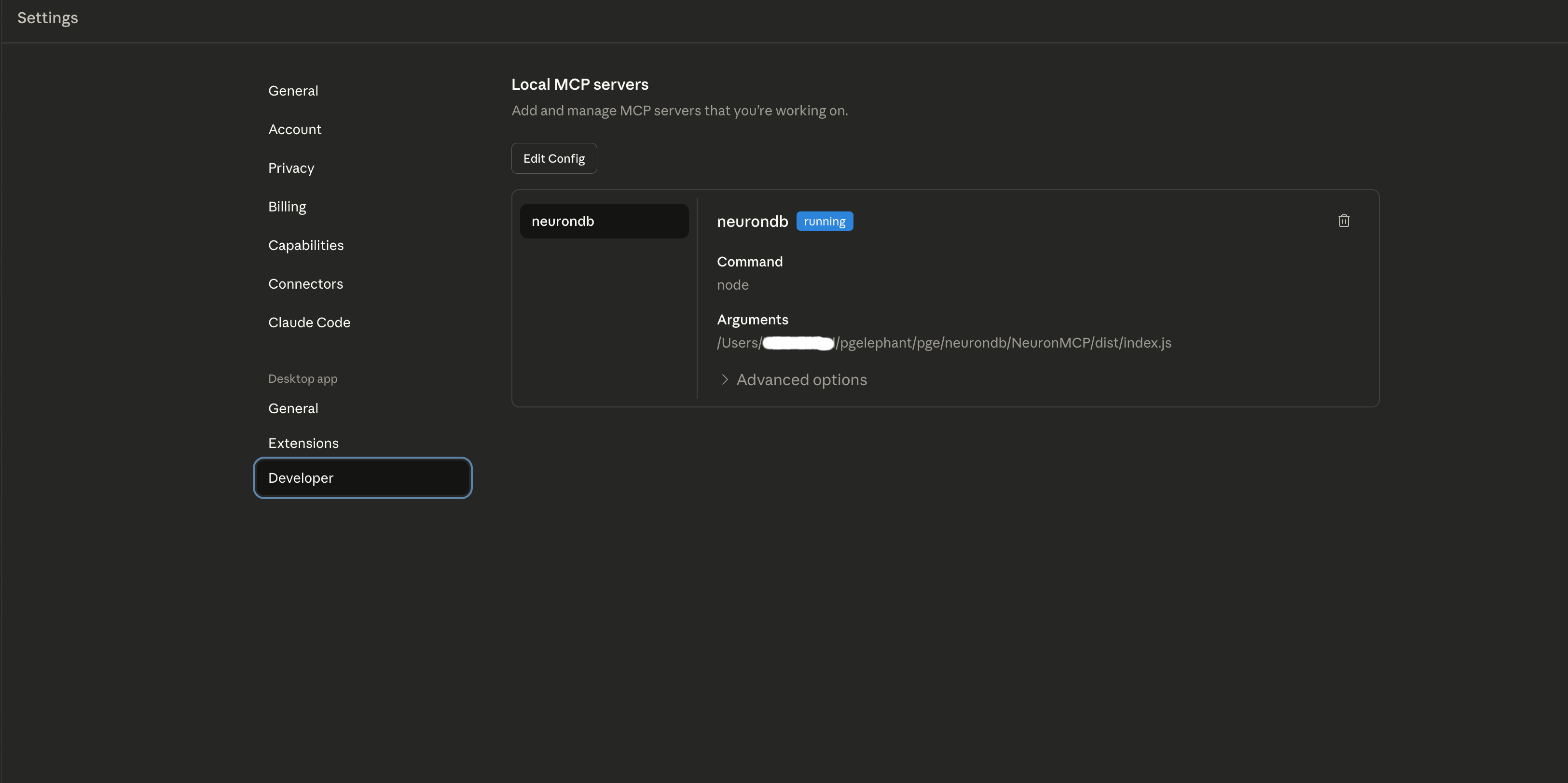
Configuration
Claude Desktop reads MCP server configuration from a settings file. The file location varies by platform. macOS uses the path ~/Library/Application Support/Claude/claude_desktop_config.json. Windows uses the path %APPDATA%\Claude\claude_desktop_config.json. Linux uses the path ~/.config/claude/claude_desktop_config.json. The configuration file must be valid JSON. The file contains a single object with an mcpServers property that maps server names to server configurations.
Each server configuration includes three main properties. The command property specifies the executable path or command to run the server. The args property is an array of command-line arguments passed to the server process. The env property is an object containing environment variables set for the server process. These environment variables can include API keys, database connection strings, and other sensitive configuration data.
To configure NeuronMCP, create or edit the configuration file for the platform. Add a server entry with the name "neurondb". Set the command property to the full path of the neurondb-mcp executable. Set the args property to include the database connection string. Set the env property to include any required environment variables such as API keys or log levels.
Configuration example for NeuronMCP:
{"mcpServers": {"neurondb": {"command": "/usr/local/bin/neurondb-mcp","args": ["--database","postgresql://user:password@localhost:5432/neurondb"],"env": {"NEURONDB_LOG_LEVEL": "info","NEURONDB_API_KEY": "api-key-value"}}}}
Multiple servers can be configured in the same file. Each server entry has a unique name. The name appears in Claude Desktop's interface when tools are used. Server names should be descriptive and avoid conflicts with other configured servers.
Configuration example with multiple servers:
{"mcpServers": {"neurondb": {"command": "/usr/local/bin/neurondb-mcp","args": ["--database", "postgresql://localhost/neurondb"],"env": {"NEURONDB_LOG_LEVEL": "info"}},"filesystem": {"command": "npx","args": ["-y","@modelcontextprotocol/server-filesystem","/path/to/allowed/directory"]},"github": {"command": "npx","args": ["-y", "@modelcontextprotocol/server-github"],"env": {"GITHUB_PERSONAL_ACCESS_TOKEN": "token-value"}}}}
After saving the configuration file, restart Claude Desktop. Claude Desktop reads the configuration file on startup. If the configuration is invalid, Claude Desktop logs an error and skips the problematic server entries. Valid servers are started automatically. Server processes run in the background and remain active throughout the Claude Desktop session.
Server Lifecycle
Claude Desktop manages server lifecycle automatically. When Claude Desktop starts, it reads the configuration file and validates the JSON structure. For each configured server, Claude Desktop spawns a separate process using the specified command and arguments. Each server runs in its own process space with the configured environment variables. Claude Desktop creates stdio pipes to communicate with each server process. The server reads requests from stdin and writes responses to stdout.
When Claude needs to use a tool, it identifies which server provides that tool. Claude sends a JSON-RPC request to the appropriate server through the stdio pipe. The server processes the request, executes the tool, and returns a JSON-RPC response. Claude receives the response and incorporates the results into its reply. Tool usage appears in the conversation interface, showing which tools were called and what results were returned.
If a server process crashes or exits unexpectedly, Claude Desktop detects the failure and logs an error. The server is not automatically restarted. The configuration file must be corrected and Claude Desktop must be restarted to recover. Server processes remain active until Claude Desktop exits or the configuration is changed.
Tool Integration
Claude Desktop integrates MCP tools into conversations. When a question requires external data or operations, Claude analyzes the query and identifies relevant tools from available MCP servers. Claude calls the appropriate tools automatically and incorporates the results into its response. Tool usage appears in the conversation interface, showing which tools were called and what data was retrieved. This integration happens transparently without requiring manual tool selection or configuration.
Security Considerations
MCP servers run with the same permissions as Claude Desktop. Only trusted servers should be configured. Server processes can access local files, network resources, and system APIs based on the permissions of the user running Claude Desktop. Configuration files should be protected with appropriate file permissions to prevent unauthorized access or modification. On Unix systems, set file permissions to 600 to restrict access to the owner only.
Claude Desktop provides sandboxing options through configuration. Server access can be restricted to specific directories by configuring allowed paths in the server arguments. Environment variables can limit server capabilities by controlling which features are enabled or which resources are accessible. Process isolation prevents servers from accessing Claude Desktop's memory or internal state. Each server runs in a separate process with its own memory space and file descriptors.
Known MCP Servers
The MCP ecosystem includes servers for various use cases. These servers provide tools and resources for different domains. Popular servers include filesystem access, database connectivity, API integration, and development tools.
Filesystem Servers
Filesystem MCP servers provide file and directory access. The official filesystem server allows reading and writing files in specified directories. It supports file listing, content reading, and content writing. Allowed directories are configured for security. The filesystem server provides features including reading files in allowed directories, writing files in allowed directories, listing directory contents, and searching file contents.
Database Servers
Database MCP servers provide database connectivity. They expose tools for querying databases, reading schemas, and executing SQL. Popular implementations include PostgreSQL, MySQL, and SQLite servers. Database servers provide features including executing SQL queries, reading database schemas, listing tables and columns, and querying with parameter binding.
API Integration Servers
API integration servers connect to external APIs. They provide tools for making HTTP requests, handling authentication, and processing responses. Examples include GitHub, Slack, and Google APIs. API integration servers provide features including reading repository information, searching code and issues, creating pull requests, and managing repository settings.
Development Tools
Development tool servers provide programming-related capabilities including code execution, package management, and build tools. Examples include Python execution, npm package management, and Docker operations. Development tool servers provide features including executing Python code, installing packages, running scripts, and accessing Python standard library.
Vector Database Servers
Vector database servers provide vector search capabilities. They expose tools for similarity search, embedding generation, and index management. Examples include Pinecone, Weaviate, and NeuronDB servers. The neurondb-mcp server provides features including vector similarity search, embedding generation, index creation and management, and multi-vector operations. See the NeuronMCP documentation for complete details.
What is NeuronMCP
NeuronMCP is an MCP server implementation for NeuronDB. It enables MCP-compatible clients to access NeuronDB's vector search capabilities, ML inference capabilities, and analytics capabilities. Clients can perform vector searches, generate embeddings, train models, and analyze data through the MCP protocol.
NeuronMCP implements the full MCP specification. It provides tools for vector operations, ML operations, analytics, and RAG pipelines. It exposes resources for database schemas, model catalogs, and query results. It supports middleware for custom integrations. For installation and setup instructions, see the NeuronMCP documentation.
Architecture
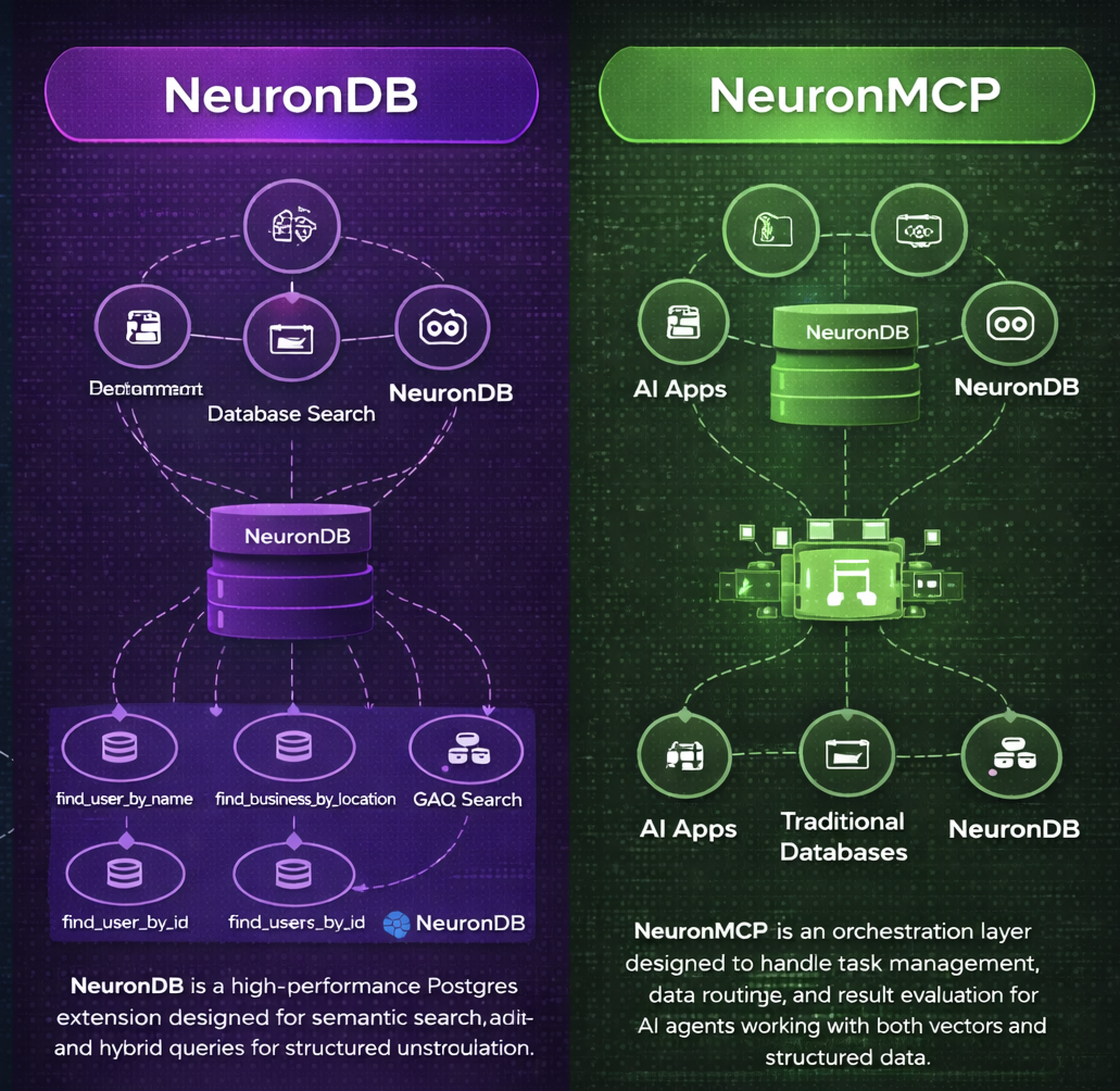
NeuronMCP follows a modular architecture where the core server handles protocol communication, tool handlers implement specific operations, resource providers expose data sources, and middleware components enable custom processing.
Architecture components:
MCP Client (Claude Desktop)
    ↓
JSON-RPC 2.0 Protocol Handler
    ↓
Tool Router
    ↓
Tool Handlers (Vector, ML, Analytics, RAG)
    ↓
NeuronDB Extension (PostgreSQL)
Protocol Implementation
NeuronMCP implements JSON-RPC 2.0 over stdio and handles initialization, tool discovery, tool execution, and resource access. It supports error handling, request validation, and response formatting. The implementation follows MCP specification version 2024-11-05.
Tool Categories
NeuronMCP provides tools in four categories. Vector operations tools enable similarity search and embedding management. ML operations tools enable model training and inference. Analytics tools enable data analysis and clustering. RAG operations tools enable retrieval-augmented generation.
Vector Operations Tools
Vector operations tools include vector_search for searching similar vectors in database tables. They include generate_embedding for generating embeddings for text or images. They include create_index for creating HNSW or IVFFlat indexes on vector columns. They include batch_embed for generating embeddings for multiple texts. They include hybrid_search for combining vector and full-text search.
ML Operations Tools
ML operations tools include train_model for training machine learning models. They include predict for making predictions using trained models. They include evaluate_model for evaluating model performance. They include list_models for listing available models in catalog. They include load_model for loading models from catalog.
Analytics Tools
Analytics tools include cluster_data for performing clustering analysis. They include reduce_dimensions for applying dimensionality reduction. They include detect_outliers for identifying outliers in data. They include compute_metrics for calculating quality metrics. They include analyze_time_series for performing time series analysis.
RAG Operations Tools
RAG operations tools include retrieve_context for retrieving relevant context for queries. They include rerank_results for reranking search results using cross-encoder. They include generate_response for generating responses using LLM integration. They include process_documents for processing and chunking documents. They include build_rag_pipeline for creating complete RAG pipelines.
Resource Providers
NeuronMCP exposes resources for database information and query results. The resource neurondb://schema/tables lists all tables in database, neurondb://schema/table/{name} gets table schema, neurondb://models/catalog lists available models, neurondb://models/{name} gets model information, and neurondb://results/{id} accesses query results.
Middleware Support
NeuronMCP supports middleware for custom processing where middleware can intercept requests, modify parameters, transform responses, and add logging. This enables custom integrations and extensibility.
Comparison with Other MCP Servers
NeuronMCP differs from other MCP servers in several ways. The following table compares NeuronMCP with other popular MCP servers.
| Feature | NeuronMCP | server-filesystem | server-postgres | server-github | server-python |
|---|---|---|---|---|---|
| Vector Search | Yes, database-native | No | No | No | No |
| ML Algorithms | 52 algorithms in-database | No | No | No | External only |
| Embedding Generation | Yes, in-database | No | No | No | External only |
| RAG Pipeline | Complete in-database | No | No | No | No |
| GPU Acceleration | Yes, CUDA/ROCm/Metal | No | No | No | No |
| Database Integration | PostgreSQL native | No | Yes, SQL only | No | No |
| File Operations | No | Yes | No | No | No |
| API Integration | No | No | No | Yes, GitHub | No |
| Code Execution | No | No | No | No | Yes, Python |
| Hybrid Search | Yes, vector + FTS | No | No | No | No |
| Background Workers | 4 workers | No | No | No | No |
| Quantization | FP16, INT8, Binary | No | No | No | No |
| Distance Metrics | 10+ metrics | No | No | No | No |
| Model Catalog | Built-in | No | No | No | No |
| Installation | See documentation | npm install | npm install | npm install | npm install |
NeuronMCP provides database-native vector operations that run within PostgreSQL without requiring external services. Other vector database servers require separate infrastructure, which adds network latency and operational complexity. NeuronMCP includes 52 ML algorithms with training and inference running in-database, while other MCP servers require external ML services that add API dependencies and cost overhead. NeuronMCP integrates with PostgreSQL using standard SQL syntax, whereas other servers require custom APIs that add learning curve and maintenance burden.
Real-World Use Cases
NeuronMCP enables various use cases through Claude Desktop integration. The following examples show complete workflows with detailed steps and results.
Semantic Search Assistant
A database contains 10,000 research papers. A query requests documents about machine learning algorithms. Claude Desktop is opened. The query "Find papers about neural network training methods" is entered.
Claude identifies that this requires a semantic search. Claude calls NeuronMCP's vector_search tool. The tool receives the query text "neural network training methods". The tool generates an embedding using the default model. The embedding has 384 dimensions. The tool searches the documents table. The tool uses cosine similarity. The tool returns the top 10 results.
The results include document IDs, titles, similarity scores, and metadata. Document 1 has title "Deep Learning Optimization Techniques" with similarity score 0.94. Document 2 has title "Training Neural Networks Efficiently" with similarity score 0.91. Document 3 has title "Gradient Descent Variants" with similarity score 0.88.
Claude formats these results. Claude shows the top 5 documents with their titles and similarity scores. Claude explains that these documents match the query semantically even though they use different wording. Follow-up questions can be asked. Claude can retrieve full document content using the document IDs.
RAG-Powered Q&A
A knowledge base contains 5,000 technical documentation pages. The query "How do I configure HNSW index parameters for optimal performance?" is entered. Claude needs to retrieve relevant context from the knowledge base.
Claude calls NeuronMCP's retrieve_context tool. The tool receives the query "How do I configure HNSW index parameters for optimal performance?". The tool generates an embedding for the query. The tool searches the knowledge_base table. The tool retrieves the top 5 relevant chunks. Each chunk contains 500 words of documentation.
The retrieved chunks include information about HNSW index creation, parameter tuning, performance benchmarks, and best practices. Claude then calls the rerank_results tool to improve precision. The reranking uses a cross-encoder model. It scores each chunk for relevance to the specific question.
The reranked results show chunk 3 has the highest relevance score. Chunk 3 contains detailed information about HNSW m parameter and ef_construction parameter. Claude uses this context to generate a comprehensive answer.
Claude's response explains that HNSW index parameters include m for connections per layer and ef_construction for index quality. Higher m values improve recall but increase index size. Higher ef_construction values improve recall but slow index creation. Claude recommends m=16 and ef_construction=64 for most use cases. Claude cites the source documentation chunk.
Follow-up questions can be asked. Claude maintains context from the previous retrieval. Claude can retrieve additional chunks if needed.
Data Analysis Assistant
A dataset contains 50,000 customer records. Each record contains purchase history, demographics, and behavior metrics. The query "Identify customer segments and find outliers in the purchase data" is entered.
Claude calls NeuronMCP's cluster_data tool. The tool receives the table name "customers". The tool receives column names ["purchase_amount", "frequency", "recency"]. The tool uses k-means algorithm. The tool sets n_clusters to 5. The tool processes all 50,000 records.
The clustering results show 5 distinct customer segments. Segment 1 contains 12,000 customers with high purchase amounts and high frequency. Segment 2 contains 8,000 customers with low purchase amounts but high frequency. Segment 3 contains 15,000 customers with medium purchase amounts and medium frequency. Segment 4 contains 10,000 customers with high purchase amounts but low frequency. Segment 5 contains 5,000 customers with low purchase amounts and low frequency.
Claude then calls the detect_outliers tool. The tool uses the Isolation Forest algorithm. The tool identifies 250 outlier records. These outliers have unusual purchase patterns that do not fit any segment.
Claude calls the compute_metrics tool to calculate quality metrics. The tool computes Davies-Bouldin Index of 0.45, which indicates good cluster separation. The tool computes silhouette score of 0.72, which indicates well-defined clusters.
Claude presents the results. Claude shows the 5 customer segments with their characteristics and sizes. Claude lists the 250 outliers with their unusual patterns. Claude explains the quality metrics. Claude suggests next steps for marketing campaigns based on the segments.
Embedding Generation Assistant
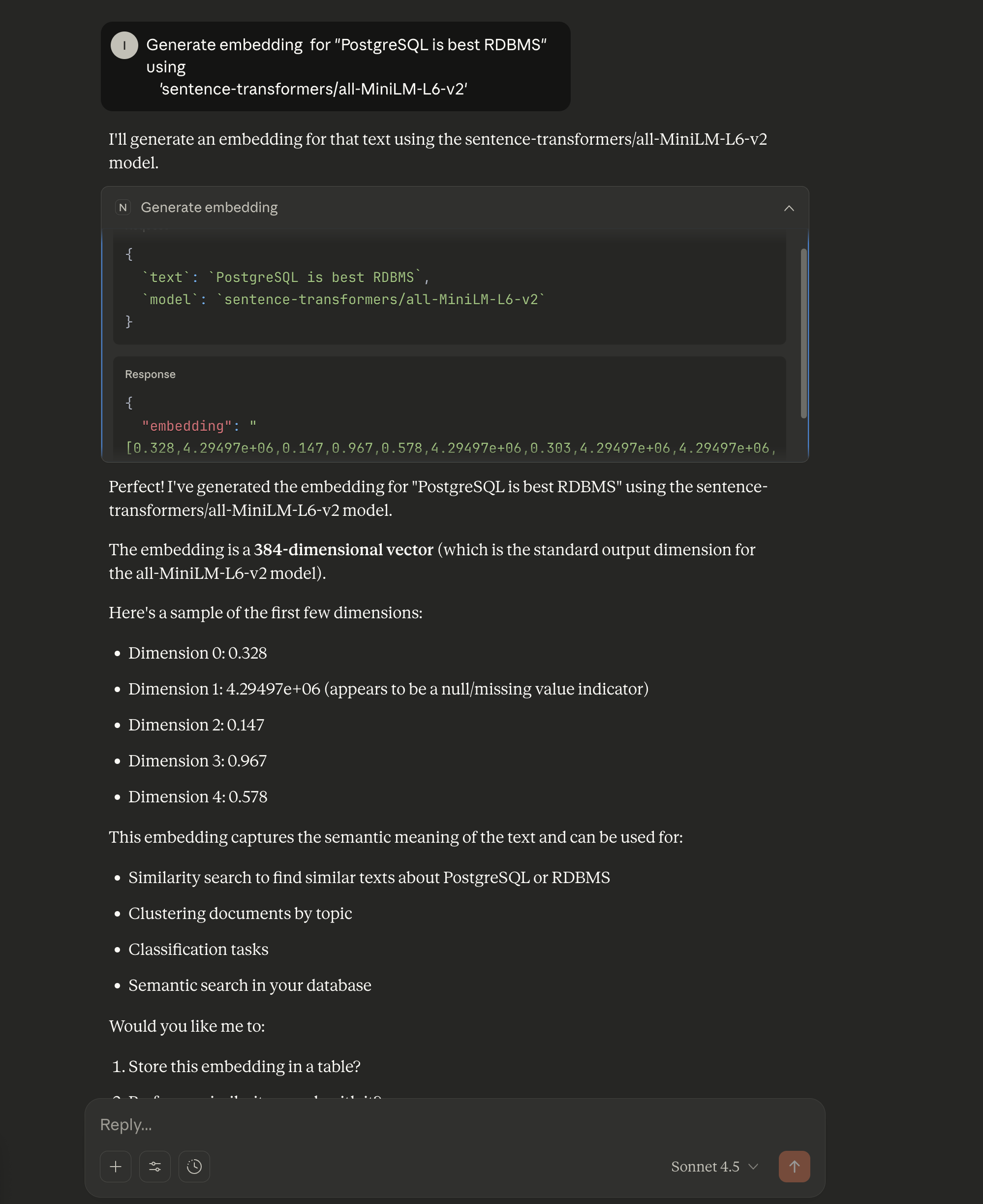
A user needs to generate embeddings for text data stored in a database. The query "Generate embedding for 'PostgreSQL is best RDBMS' using 'sentence-transformers/all-MiniLM-L6-v2'" is entered in Claude Desktop.
Claude identifies that this requires embedding generation. Claude calls NeuronMCP's generate_embedding tool. The tool receives the text "PostgreSQL is best RDBMS". The tool receives the model name "sentence-transformers/all-MiniLM-L6-v2". The tool connects to the PostgreSQL database. The tool loads the embedding model if not already loaded. The tool generates the embedding vector.
The tool returns a 384-dimensional vector. The embedding captures the semantic meaning of the text. The vector values range from -1 to 1. The embedding can be used for similarity search, clustering, classification, or semantic search in the database.
Claude presents the results. Claude shows that the embedding is a 384-dimensional vector, which is the standard output dimension for the all-MiniLM-L6-v2 model. Claude displays a sample of the first few dimensions. Claude explains that this embedding captures the semantic meaning of the text and can be used for similarity search to find similar texts about PostgreSQL or RDBMS, clustering documents by topic, classification tasks, and semantic search in the database.
Claude offers to store the embedding in a table. Claude can use the embedding for vector search operations. Claude can generate embeddings for multiple texts in batch operations.
Model Training Assistant
A training dataset contains 100,000 records for predicting customer churn. The dataset contains 20 features including account age, usage patterns, support tickets, and billing information. The query "Train a model to predict customer churn and evaluate its performance" is entered.
Claude calls NeuronMCP's train_model tool. The tool receives the algorithm name "random_forest". The tool receives the table name "customer_data". The tool receives feature column names ["account_age", "monthly_usage", "support_tickets", "billing_amount", and 16 others]. The tool receives the target column name "churned". The tool receives the model name "churn_predictor_v1".
The training process begins. The tool splits the data into 80% training set and 20% validation set. The tool trains a Random Forest model with 100 trees. The tool uses GPU acceleration for faster training. The training completes in 45 seconds.
The tool returns training metrics. Accuracy is 0.92. Precision is 0.89. Recall is 0.91. F1 score is 0.90. The model identifies account age and monthly usage as the most important features.
Claude then calls the evaluate_model tool. The tool runs the model on the validation set. The tool generates a confusion matrix. The tool calculates ROC AUC of 0.94. The tool saves the model to the catalog with version "v1".
Claude presents the results. Claude shows the model performance metrics. Claude explains that the model correctly predicts churn for 92% of customers. Claude shows the feature importance rankings. Claude suggests deploying the model for production use. Claude explains how to use the model for predictions on new customer data.
Installation
For installation instructions, configuration details, and setup guides, see the NeuronMCP documentation. The documentation includes platform-specific installation steps, configuration examples, and troubleshooting guides. For building from source, see the NeuronDB GitHub repository.
Conclusion
MCP Server enables AI assistants to access external tools and resources. The protocol provides a standardized interface for communication. It uses JSON-RPC 2.0 over stdio for simplicity and security.
Claude Desktop integrates MCP servers through configuration files. Servers are configured in settings files. Tools are used in conversations. The integration is transparent.
NeuronMCP provides NeuronDB access through MCP. It exposes vector operations. It exposes ML operations. It exposes analytics. It exposes RAG capabilities. Clients can perform complex operations through simple tool calls.
The MCP ecosystem includes servers for various use cases. Filesystem servers enable file access. Database servers enable database connectivity. API servers enable external API integration. Development tool servers enable code execution. The protocol is extensible. The protocol is language-agnostic.
Related Blog Posts
NeuronDB a PostgreSQL AI Extension
NeuronDB extension with vector search, ML inference, and RAG capabilities.
Semantic Search Over Text with NeuronDB
Build semantic search systems with document chunking and hybrid search.
Vector operations, indexing, and similarity search in PostgreSQL.
Support
For questions, issues, or commercial support, contact support@neurondb.ai